IncidentAI

AI security incident management for lean response teams.

IncidentAI helps teams triage security incidents, classify severity, coordinate owners, map response actions, and preserve a clean incident record with AI-assisted ticketing.

Enterprise access only. aneo provisions IncidentAI after onboarding so workflows, roles, and response records match the customer environment.

IncidentAI dashboard showing incident operations metrics, priority mix, and status flow
Example dashboard with open work, high-priority and resolved ticket counts, priority distribution, and a status-flow view.
Direct answer

What is IncidentAI?

IncidentAI is an enterprise AI-powered security incident management and ticketing system. It supports triage, classification, ownership, response planning, MITRE ATT&CK mapping, evidence notes, and closure summaries so incident work is easier to act on and easier to explain.

IncidentAI recordHuman review required
INC-1048

Suspicious admin login pattern

AI, manual, or email intakeAttachment contextConfidence and reviewMITRE ATT&CK mappingOwner and statusRCA draft
Intake

Capture the incident

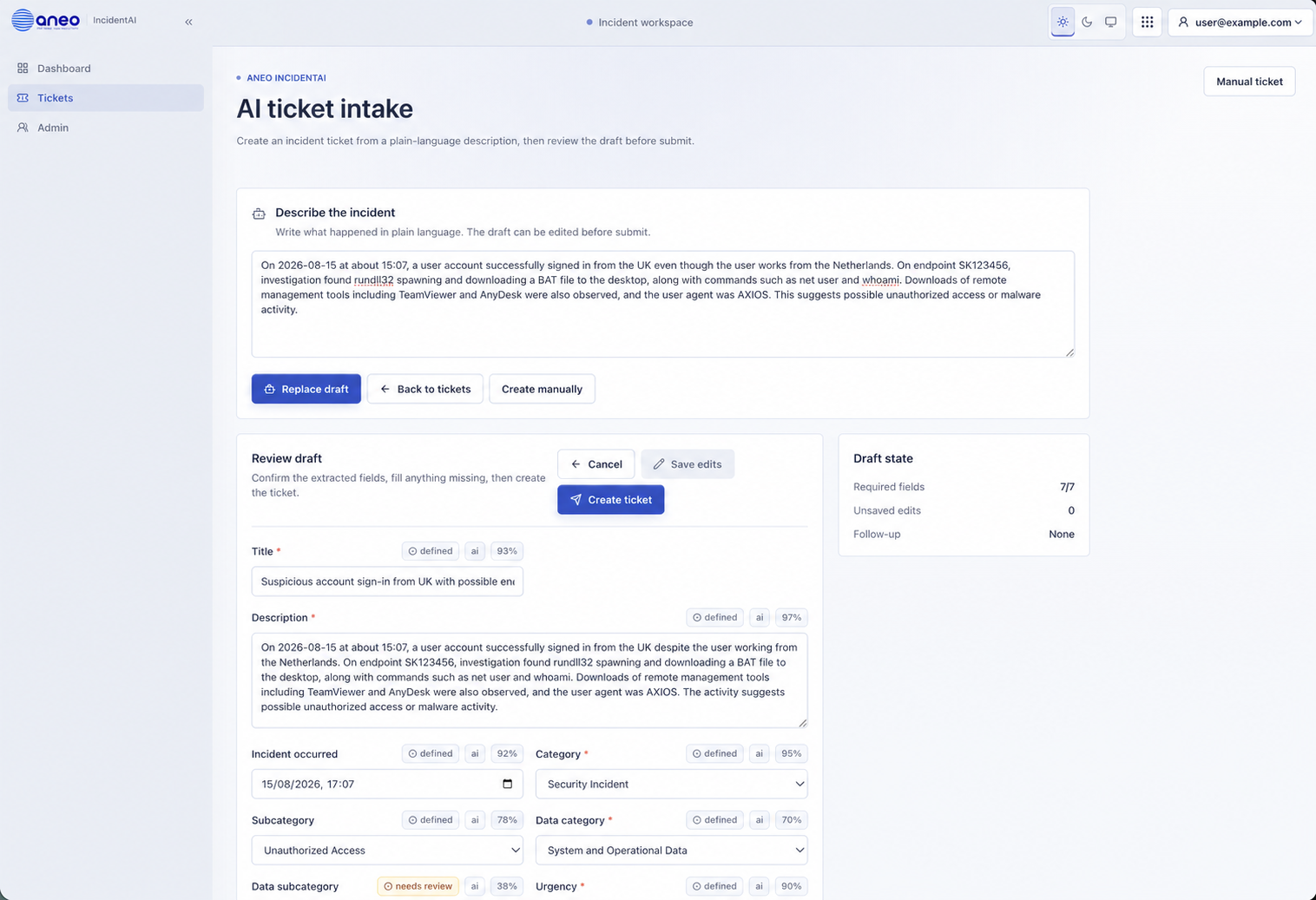
Start with AI plain-English intake, manual entry, or a complete ticket from an organisation-configured email address.

Enrichment

Add context and evidence

Review extracted fields, add attachments, and regenerate resolution or remediation outputs when new context arrives.

Triage

Set severity and ownership

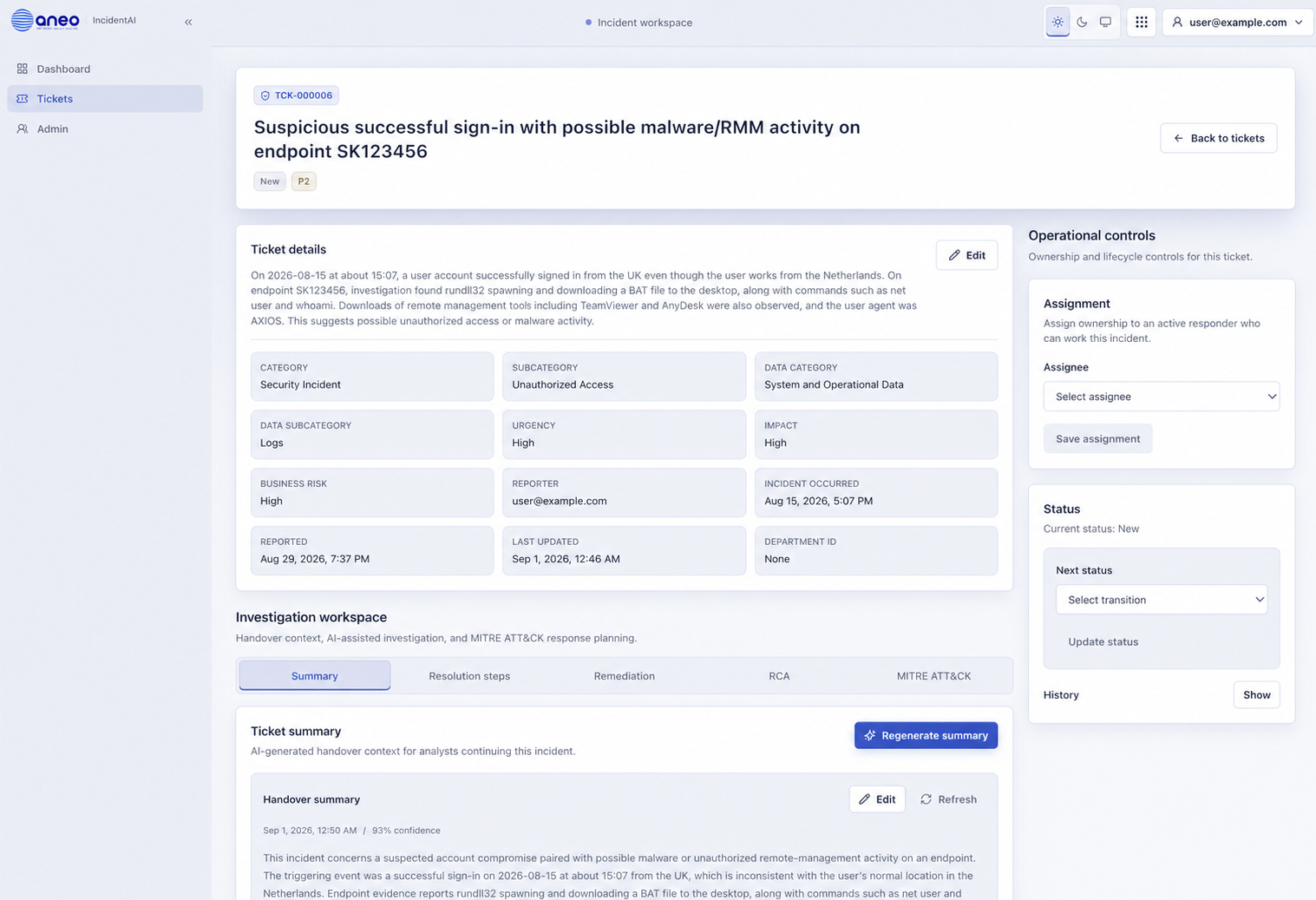
Confirm category, data, urgency, impact, business risk, priority, confidence, assignee, and status.

Investigation

Test the incident story

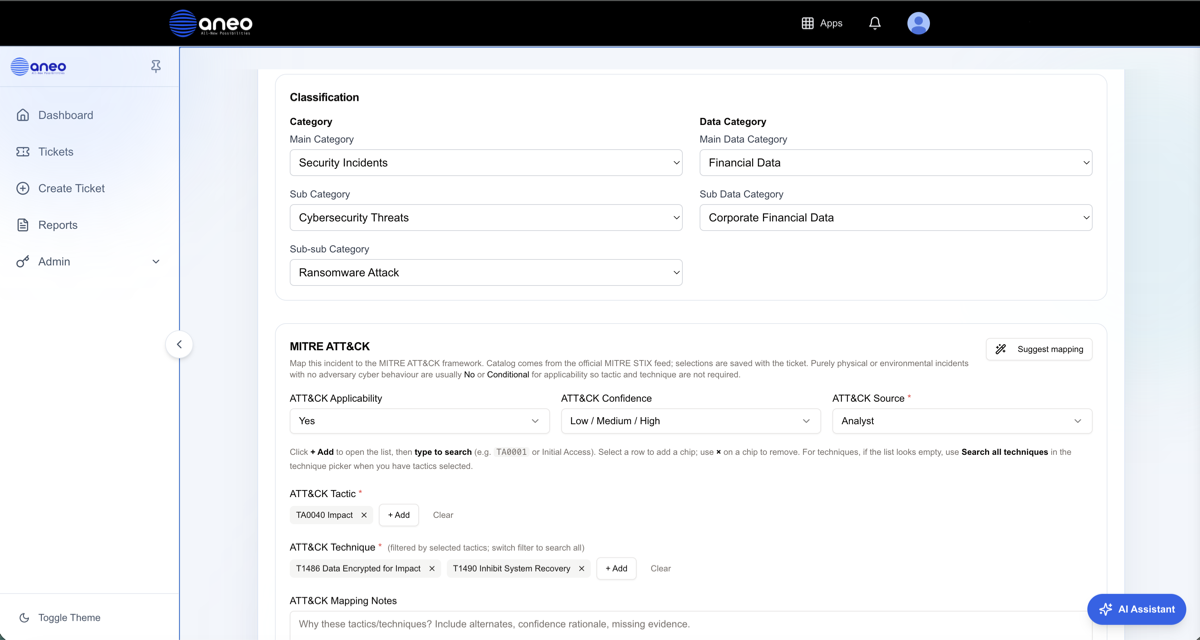
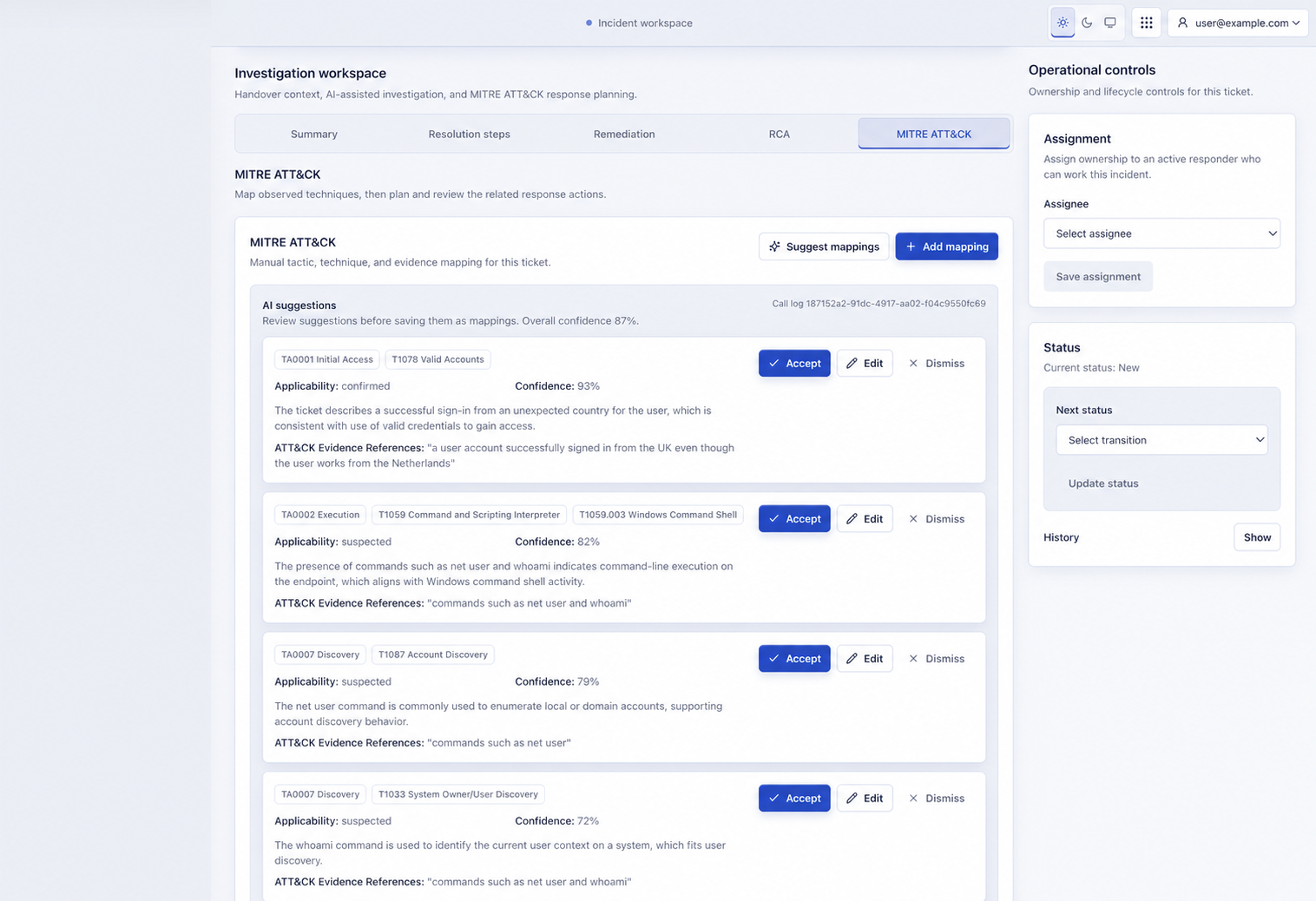
Add comments, review evidence and activity, build the timeline, and accept or edit MITRE ATT&CK mappings.

Response

Plan and track action

Generate containment, investigation, validation, and recovery actions, then assign, update, and resolve with a reason.

RCA

Close with learning

Generate an editable RCA from the activity log, comments, attachments, and final resolution data.

Signature workflow

From intake to RCA, without losing the record.

IncidentAI follows the full incident lifecycle: intake, enrichment, triage, investigation, response, and RCA. AI organizes the work, while accountable people review the evidence, approve actions, and own closure.

AI incident triageSecurity ticketingRoot cause analysis
Key outcomes

Bring structure to the first hour and the final record.

IncidentAI is designed for teams that need faster security incident response without losing decision quality, ownership, or auditability.

Faster triage

Classify incident type, severity, affected systems, business impact, and required response actions with AI assistance.

Clear ownership

Assign owners, next steps, approvals, and handoffs so security, IT, legal, and operations teams stay aligned.

Better response records

Keep timelines, notes, evidence, rationale, and decisions together for review, reporting, and post-incident improvement.

Less analyst fatigue

Reduce repetitive ticket work with summaries, suggested actions, duplicate checks, and consistent incident documentation.

How it works

The incident lifecycle from intake to RCA.

IncidentAI makes each stage visible, with AI support where it reduces manual work and ambiguity without removing human review from the process.

01

Intake the incident

Create a ticket with AI plain-English intake, fill it manually, or receive a complete ticket with attachments through an organisation-configured email address.

02

Enrich the record

Review extracted fields, add attachments and analyst context, and regenerate resolution or remediation outputs when the evidence changes.

03

Triage severity and priority

Confirm category, data, urgency, impact, business risk, priority, confidence, ownership, and the next status transition.

04

Investigate and map behaviour

Use comments, attachments, activity history, timelines, and reviewable MITRE ATT&CK mappings to test what happened.

05

Coordinate the response

Generate containment, investigation, validation, and recovery actions, assign the work, update status, and provide a reason when resolving.

06

Generate and review the RCA

Once resolved, IncidentAI generates an editable RCA using the complete activity log, comments, attachments, and final resolution data.

AI assistance

Use AI where incident work becomes repetitive, ambiguous, or easy to lose.

IncidentAI helps analysts summarize context, reduce noise, propose response paths, and maintain a consistent record while human teams remain in control of decisions and actions.

Natural-language triage summaries for security and IT incidents
Root-cause hypotheses with clear confidence signals
Severity, impact, category, and data classification support
MITRE ATT&CK tactic and technique mapping assistance
Suggested remediation steps, playbooks, and next actions
Duplicate checks and related incident context
Timeline, notes, audit log, and closure summary generation
Handoffs to ticketing or communication tools where configured

Enterprise access

IncidentAI is provisioned after onboarding, not opened as a direct self-service signup.

Security incident workflows are sensitive. aneo sets up IncidentAI with the customer so access, process, data handling, and response expectations are clear before teams start using it.

Provisioned access

IncidentAI is set up by aneo after onboarding so users, roles, permissions, workflows, and response records match the customer environment.

Configured workflows

Teams can align incident categories, escalation paths, approval steps, reporting needs, and playbooks to their operating model.

Human-in-the-loop control

AI suggests classification, rationale, summaries, and next actions. Your team remains responsible for review, approval, and execution.

Trust and control

IncidentAI supports response discipline. It does not replace accountable security decisions.

IncidentAI can draft triage logic, summaries, likely causes, suggested next steps, and response records. Your organization remains responsible for validation, execution, communication, and closure.

  • Role-based access for controlled incident work
  • Human review before response actions are accepted
  • Audit trail and exportable incident history
  • Encryption in transit and at rest
  • Zero data retention options and EU data residency available on request
FAQ

IncidentAI questions, answered directly.

What is IncidentAI?

IncidentAI is an enterprise AI security incident management and ticketing system that helps teams triage incidents, classify severity, coordinate response actions, and preserve a clear incident record.

Can users sign up for IncidentAI directly?

No. IncidentAI is an enterprise product. aneo provides access after a demo and onboarding so customer users, roles, workflows, and incident processes are configured correctly.

Does IncidentAI automatically fix incidents?

No. IncidentAI proposes classification, likely causes, response steps, summaries, and documentation. Human teams review and approve decisions before action is taken.

Does IncidentAI support MITRE ATT&CK mapping?

Yes. IncidentAI can assist with MITRE ATT&CK tactic and technique mapping where the incident has relevant cyber behavior and enough context for analysis.

Who is IncidentAI built for?

IncidentAI is built for lean security, IT, SecOps, MSP, and operations teams that need structured incident handling without adding unnecessary process overhead.

What does IncidentAI help document?

IncidentAI helps document incident classification, severity, data category, suspected cause, response steps, ownership, notes, timeline, decisions, evidence, and closure summaries.

Next step

Book a demo for enterprise AI incident management.

Talk to aneo about IncidentAI access, onboarding, workflows, roles, data handling, and how AI-assisted incident ticketing can fit your response process.